
Manual Posting Is Killing Your Law Firm's Growth
Marketing automation and social media are no longer optional for law firms that want to compete — they are the baseline. If your team is still writing, designing, and posting content by hand every week, you are spending hours on tasks that software can handle in minutes.
Here is what you need to know right away:
| What It Is | What It Does for Your Firm |
|---|---|
| Social media automation | Schedules, publishes, and monitors posts without manual effort |
| AI content tools | Draft captions, repurpose blogs, and suggest posting times |
| CRM integration | Links social interactions to contact records and lead tracking |
| Analytics automation | Reports on reach, engagement, and pipeline impact automatically |
| Approval workflows | Routes AI-drafted posts to an attorney for review before publishing |
Manual social media management typically takes 5 to 20 minutes per post, plus up to an hour a day for engagement and replies. For a busy attorney juggling client work, depositions, and business development, that time simply does not exist. Automation gives it back.
The stakes are real. Legal professionals who adopted AI tools report saving five or more hours per week on routine marketing tasks. Firms that move from inconsistent posting to a daily cadence typically see engagement rates double within 60 to 90 days.
But automation done wrong — robotic replies, generic content, no attorney oversight — can damage your reputation and potentially violate bar association advertising rules. This guide covers how to do it right.
I'm Corey Larson, founder of Outlier Creative Agency, where we specialize in high-level content strategy and digital marketing built specifically for law firms — including helping practices implement compliant, effective marketing automation and social media systems that generate real caseload growth. With years of experience producing media and managing brand presence for legal clients, I'll walk you through exactly what works, what to avoid, and which tools are worth your firm's investment.
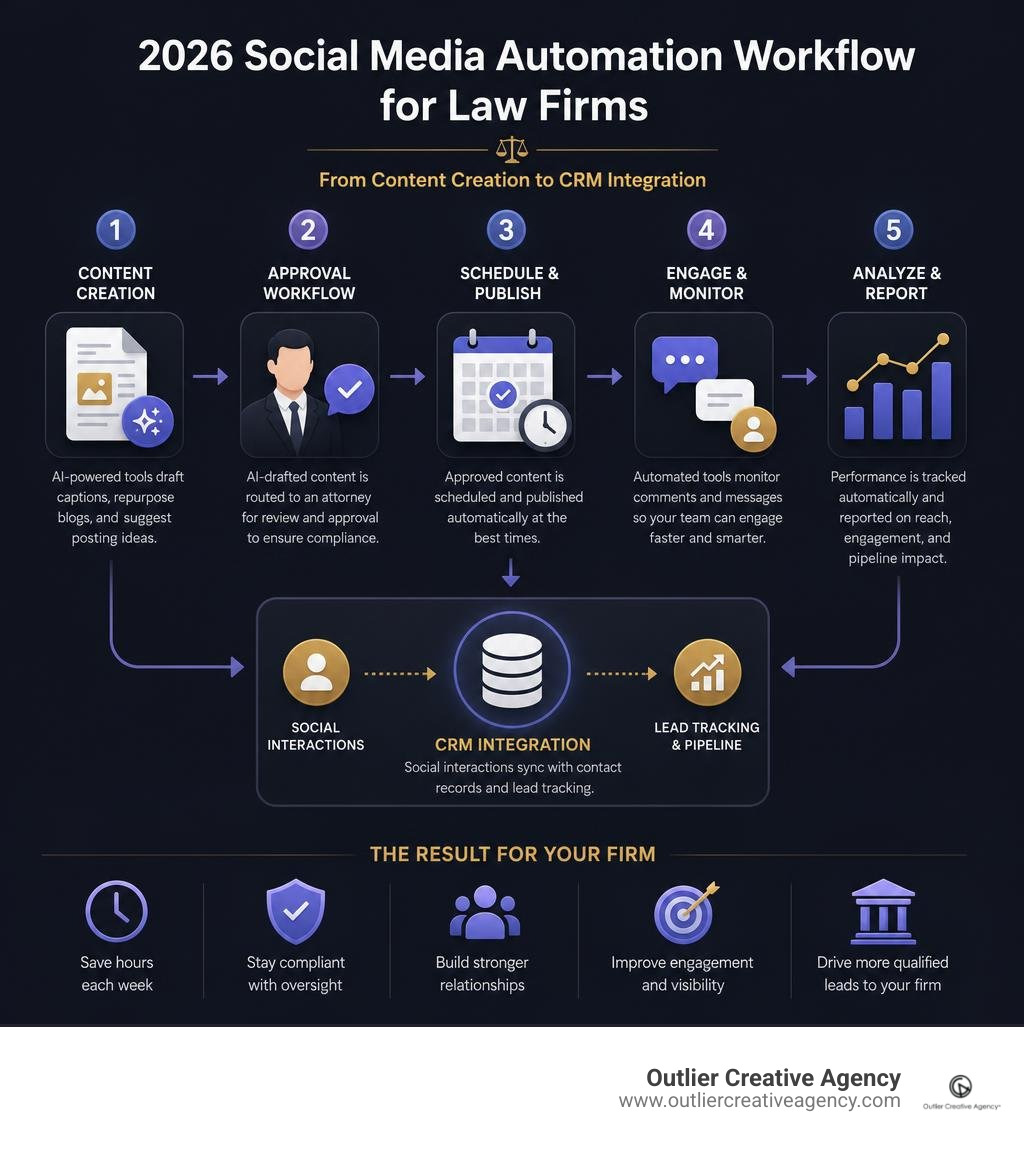
What is Social Media Automation and How Does It Differ From Basic Scheduling?
For years, "social media management" meant using a basic scheduler to queue up posts for the week. You wrote a caption, attached an image, selected a date, and clicked "schedule." While helpful, this traditional linear approach is highly manual and operates in a silo.
In July 2026, true social media automation goes far beyond basic scheduling. Modern systems combine agentic AI logic, visual non-linear workflows, and Large Language Models (LLMs) to manage your entire digital presence. Instead of just pushing a post live, a fully automated system can crawl your website to learn your brand voice, dynamically generate platform-specific post variations, monitor brand sentiment, track competitor activity, and route lead data directly to your CRM.
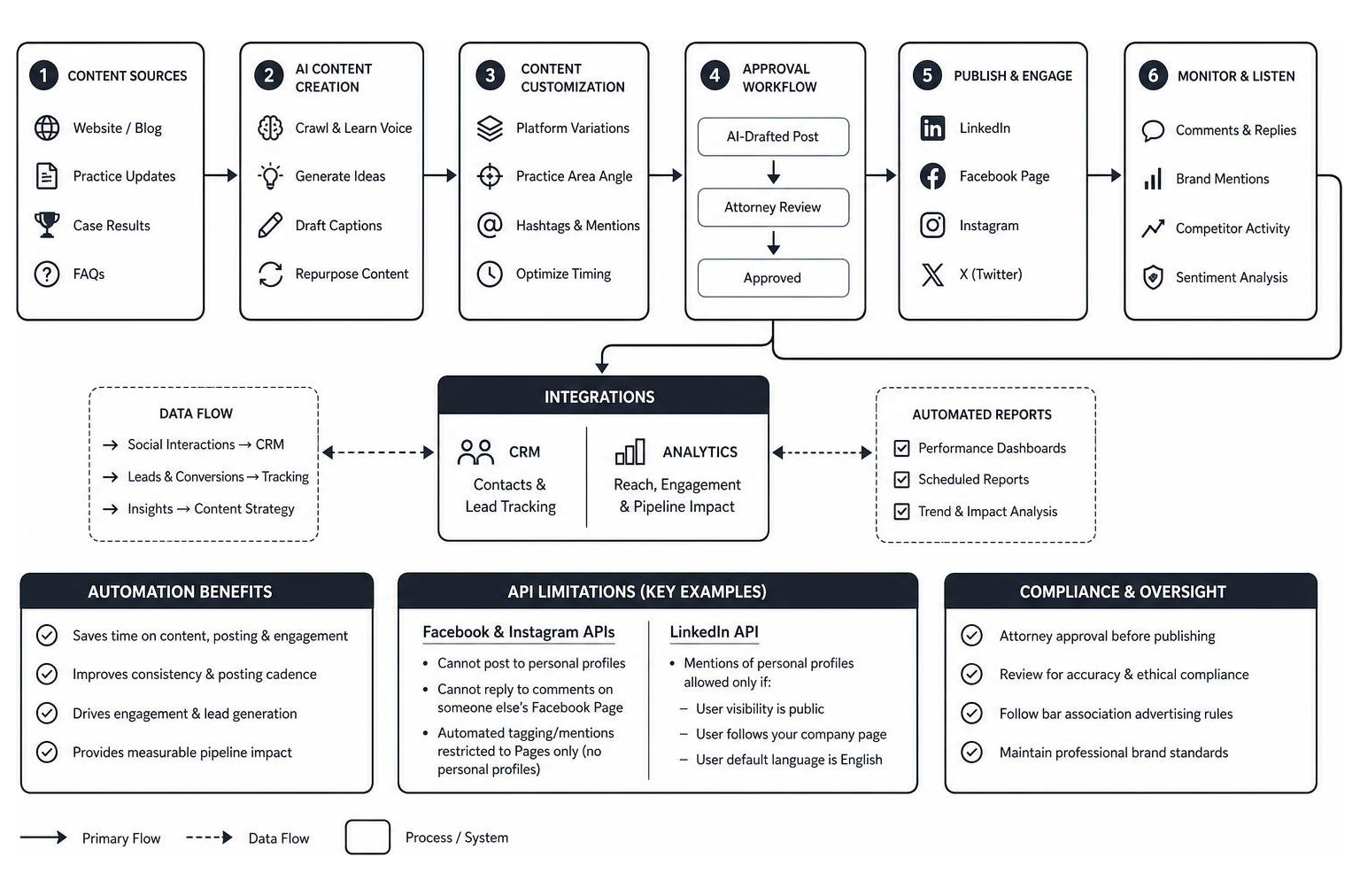
To understand this shift, we must look at the difference between traditional rule-based software and modern AI-driven systems. Traditional automation is strictly rule-based (e.g., "Post this PDF to LinkedIn on Tuesday at 10:00 AM"). Modern AI automation is adaptive; it analyzes engagement patterns to select optimal posting windows, translates complex legal updates into distinct practice-area angles, and flags potential compliance risks before publication.
However, operating these systems requires navigating strict Application Programming Interface (API) limitations. For example:
- Facebook & Instagram APIs: Third-party tools cannot post directly to personal profiles or reply to comments on someone else's Facebook Page. Furthermore, Facebook's API restricts automated tagging/mentions to Pages only — you cannot tag individual personal profiles.
- LinkedIn API: Mentions of personal profiles via automated tools are only permitted if the target user has set their visibility to public, actively follows your company page, and uses English as their default language.
- X (formerly Twitter) API: Changes to API pricing have made advanced social listening and real-time competitor tracking cost-prohibitive on entry-level plans, shifting these features to high-tier enterprise software.
Understanding how these technical mechanics function is crucial. For a deeper look at the backend technology and pricing structures of autonomous systems, see this guide on AI Social Media Automation: How It Works and What It Costs - Apaya .
Why Law Firms Need Marketing Automation and Social Media Integration
Many managing partners ask us why they should bother connecting their social media channels to a broader marketing automation system. The answer lies in the transition from vanity metrics (like "likes" and "shares") to actual business revenue.
When you treat social media as an isolated creative silo, you lose valuable context. If a local business owner in Los Angeles or Austin interacts with your LinkedIn post about corporate compliance, that interaction should not exist in a vacuum. By integrating social media with your CRM, that digital touchpoint is instantly logged. If that same user later visits your website or downloads an eBook, your intake team has a complete history of how they discovered your firm.
This integrated approach solves three major bottlenecks for growing firms:
- Consistent Lead Generation: Algorithms actively reward posting consistency and video-first formats (like Reels or Shorts). If your firm posts inconsistently because your team is too busy, your organic reach collapses. Automation ensures your profiles remain active 365 days a year, keeping your pipeline full.
- Ironclad Brand Consistency: Whether you practice personal injury in Los Angeles or business litigation in Austin, your brand voice must remain authoritative and professional. Integrated marketing systems use centralized templates and pre-approved "brand brains" to ensure every piece of content aligns with your firm's standards.
- Multi-Channel Presence Without Extra Overhead: Instead of manually formatting content for LinkedIn, Facebook, and Instagram, integrated systems allow you to draft a master update once and auto-format it to meet platform-specific requirements (such as character limits and image aspect ratios).
To explore how these connected systems build highly efficient client acquisition pipelines, read our comprehensive guides on Marketing Automation and Lead Generation and the essential Marketing Automation Tools we recommend for modern practices.
Which Legal Social Media Tasks Can Be Safely Automated?
Automation is an incredible tool for efficiency, but it must be applied selectively. In the legal industry, where trust, ethics, and credibility are paramount, certain tasks are perfect for automation, while others must remain strictly human.
We categorize safe legal automation into three primary areas:
- Evergreen Content Distribution: Educational posts, common legal FAQs, and community involvement updates can be batched, scheduled, and recycled automatically. For example, a family law firm can safely schedule a recurring monthly post explaining the difference between mediation and litigation.
- Reputation Monitoring and Social Listening: You can set up automated alerts to scan social platforms and websites for brand mentions, competitor names, and industry keywords. This acts as a proactive sentiment analysis tool, letting you know what the public is saying about your firm in real time.
- Review Management and Triage: When a client leaves a review on Google or social media, automated tools can analyze the sentiment. If it is positive, the system can draft a warm, compliant response for your team to approve. If it is negative, it can instantly alert a partner for manual escalation.
To learn more about how we build compliant, high-performing organic campaigns for attorneys, explore our specialized Services - Social Media page.
Streamlining Content Repurposing with Marketing Automation and Social Media Tools
One of the most effective ways to leverage marketing automation and social media is through content repurposing. Writing high-quality legal articles or hosting educational webinars takes significant time. Automation allows you to turn a single intellectual asset into dozens of social touchpoints.
For example, an immigration law firm in Los Angeles or Austin can host a 45-minute webinar on H-1B cap season. Using automated workflows, that single video can be processed to:
- Extract the audio to create a podcast episode.
- Use AI to identify key talking points and generate 10 to 15 platform-specific social posts.
- Package the video highlights into short-form "Content Capsules" (self-contained vertical videos) ready to post as Instagram Reels, YouTube Shorts, and TikToks.
- Draft a written summary of the compliance checklist to distribute via email.
When executing this multi-channel approach, your team can utilize centralized composers to draft a master message and customize it for individual platforms. To see the step-by-step technical process of managing multi-network publishing, refer to the official documentation on how to Create and publish social posts .
Managing Client Inquiries via Marketing Automation and Social Media Channels
According to industry data, 73% of consumers expect a brand to respond to their social media inquiry within 24 hours. For law firms, a delayed response to a direct message (DM) often means the prospect moves on to a competitor.
Automated DM workflows can bridge this gap by acting as a 24/7 digital intake assistant. When a user sends a message on Facebook or Instagram, an automated chatbot can instantly reply with a helpful, pre-defined script:
"Thank you for contacting our firm. To help us route your inquiry to the right attorney, please select the practice area that best describes your situation: [Personal Injury] [Family Law] [Business Litigation]."
Once the user selects an option, the automation can collect basic contact information and instantly sync it with your CRM, creating a new lead record. This ensures no inquiry falls through the cracks while keeping your team's inbox organized.
To build a truly seamless, CRM-connected social inbox that bridges the gap between social engagement and client acquisition, read Filip Konecny's deep dive on HubSpot Social: Best Hacks To Build a Smarter CRM-Connected Social System | Filip Konecny .
The Best Social Media Automation Tools for Law Firms in 2026
Choosing the right platform depends on your firm's size, internal resources, and growth objectives. Below, we compare the top-performing social media automation tools available in 2026:
| Platform | Best For | Key Features | Pricing (2026) | G2 Rating |
|---|---|---|---|---|
| HubSpot Social | Enterprise CRM integration | Seamless CRM context, campaign tracking, supports up to 300 accounts and 10,000 posts/month | Included in Marketing Hub Professional/Enterprise | N/A (Platform Suite) |
| Sprout Social | Advanced social listening & analytics | High-level competitor monitoring, sentiment analysis, robust team approval workflows | $99/user/month (Essentials) to $399/user/month (Advanced) | 4.4/5 (5,700+ reviews) |
| Hootsuite | Multi-profile management | Centralized social inbox, OwlyGPT risk-flagging tool, unlimited scheduling | Starts at $99/user/month (billed annually) | 4.3/5 (6,600+ reviews) |
| Buffer | Solos & small firms | Clean, simple visual scheduler, affordable channel-based pricing | Free plan (3 channels), paid plans start at $6/channel/month | 4.3/5 (1,000+ reviews) |
| Statusbrew | Mid-sized collaborative teams | Highly customizable user permissions, automated moderation, stellar customer support | Starts at $69/month (annual billing) | 4.9/5 (700+ reviews) |
| Planable | Visual content collaboration | Highly intuitive grid previews, multi-user approval workflows | Free plan (50 posts), paid plans start at $39/workspace/month | 4.6/5 (900+ reviews) |
For highly sophisticated enterprise B2B campaigns, specialized integrations are changing how marketing teams coordinate their efforts. For example, B2B-focused firms are utilizing tools like Oktopost's Claude Code Plugin to draft, schedule, and align entire multi-channel campaigns directly from strategic AI interfaces. You can read more about this advanced technical setup here: Managing B2B Social with Claude Code Skill | Oktopost .
Additionally, for tech-savvy firms with internal development resources who want to run highly customized, open-source automation pipelines locally, tools like MarketMeNow offer a unique, self-hosted option. You can explore the repository and system architecture at thearnavrustagi/marketmenow .
Best Practices for Maintaining a Human Touch and Ethical Compliance
While automation can save your firm hours of manual labor, it must never be left on complete autopilot. In legal marketing, a single non-compliant post or robotic response can lead to disciplinary action from your state bar association.

To maintain absolute ethical compliance and preserve your brand's authentic voice, implement these three core guardrails:
- Adhere to ABA Formal Opinion 512 (2024): This formal opinion outlines a lawyer's ethical duties when using generative AI tools. It emphasizes three critical responsibilities:
- Competence: You must understand how the AI tool works, including its limitations and the risk of "hallucinations" (generating inaccurate legal claims).
- Confidentiality: Never enter client-identifiable, proprietary, or sensitive case details into public AI prompts. Most public LLMs use input data to train their models, which can result in a severe breach of attorney-client privilege.
- Supervision: Partners must establish clear policies to supervise the use of AI tools by subordinate attorneys, paralegals, and external marketing agencies.
- Implement a Strict "Human-in-the-Loop" Approval Workflow: Never allow an AI tool or automated system to publish directly to your social media channels without human review. Every drafted post, image, and caption must be reviewed and approved by a licensed attorney. This ensures the content is legally accurate, professionally appropriate, and compliant with local advertising rules.
- Avoid Fully Automated Conversational Replies: While automated DMs are excellent for initial triage and intake routing, never use fully automated bots to conduct actual conversations with clients or offer specific legal advice. Keep automated responses restricted to administrative tasks (e.g., booking a consultation, sharing office hours, or directing users to educational blog posts).
Frequently Asked Questions about Legal Social Media Automation
Is AI-generated social media content ethical for law firms?
Yes, using AI to draft social media content is ethical, provided you adhere to the guidelines set by your state bar and ABA Formal Opinion 512. A licensed attorney must review, edit, and approve every post before publication to ensure it does not contain false or misleading statements, does not offer specific legal advice to non-clients, and maintains professional decorum.
How does social media automation integrate with a law firm's CRM?
Modern automation tools connect to legal CRMs (like HubSpot, Clio Grow, or Salesforce) via API integrations. When a prospect interacts with your social media page, sends a direct message, or clicks on a social ad, the automation automatically creates or updates their contact record. This allows your firm to track exactly which social media posts or campaigns are driving qualified leads, consultations, and signed cases.
What are the character limits and API restrictions for major social platforms in 2026?
Each platform enforces strict rules that third-party automation tools must follow:
- LinkedIn: Character limit is 3,000. Carousel formats (PDF uploads) yield the highest organic engagement.
- Facebook: Character limit is 2,500. Third-party APIs cannot tag personal profiles, only business Pages.
- Instagram: Character limit is 2,200. Links placed in captions are published as plain, unclickable text.
- X (Twitter): Limit is 280 characters for free accounts, and up to 25,000 for Premium subscribers.
- YouTube: Description limit is 5,000 characters.
Conclusion
Implementing a smart, compliant system for marketing automation and social media is one of the most effective ways to scale your law firm's online presence, build digital authority, and increase your caseload without sacrificing billable hours. By automating repetitive tasks like scheduling, repurposing, and initial intake routing, you free up your team to focus on what matters most: delivering exceptional results for your clients.
To stay ahead of the latest digital marketing trends, read our legal marketing Blog. If you are ready to implement a high-performing, ethical automation system tailored specifically to your practice, explore our professional email marketing services and social media solutions.
Are you ready to stop posting manually and start growing your caseload? Book a consultation with Outlier Creative Agency today to build a custom, compliant digital marketing engine for your firm.